> ## Documentation Index
> Fetch the complete documentation index at: https://docs.oxen.ai/llms.txt
> Use this file to discover all available pages before exploring further.
# 💬 Language Models
> Integrate an LLM into your application through the `/ai/chat/completions` API.
## Quick Start
The Oxen.ai chat completions API is fully [OpenAI-compatible](https://platform.openai.com/docs/api-reference/chat). You can use the OpenAI SDK, `curl`, or any HTTP client that speaks the OpenAI chat format.
**Base URL:** `https://hub.oxen.ai/api/ai`
**Endpoint:** `POST /ai/chat/completions`
Browse [all available models](https://www.oxen.ai/ai/models).
```bash cURL theme={null}
curl -X POST https://hub.oxen.ai/api/ai/chat/completions \
-H "Authorization: Bearer $OXEN_API_KEY" \
-H "Content-Type: application/json" \
-d '{
"model": "claude-sonnet-4-6",
"messages": [
{"role": "user", "content": "What is a great name for an ox?"}
]
}'
```
```python Python (OpenAI SDK) theme={null}
from openai import OpenAI
import os
client = OpenAI(
api_key=os.environ["OXEN_API_KEY"],
base_url="https://hub.oxen.ai/api/ai",
)
response = client.chat.completions.create(
model="claude-sonnet-4-6",
messages=[
{"role": "user", "content": "What is a great name for an ox?"}
]
)
print(response.choices[0].message.content)
```
## Authentication
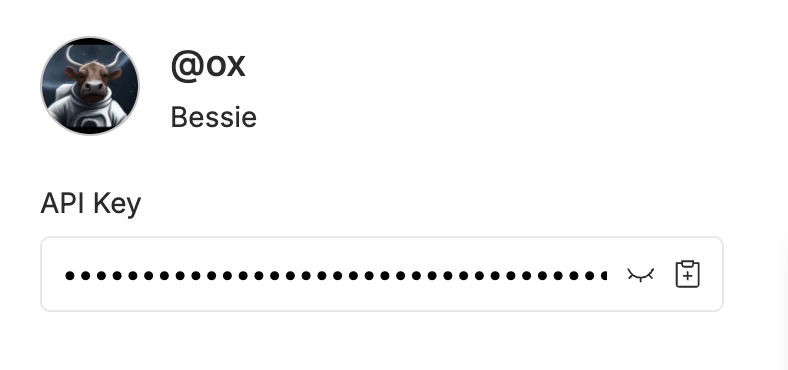
Every request requires a Bearer token in the `Authorization` header. You can find your API key in your [account settings](https://www.oxen.ai/settings/profile).
```bash theme={null}
Authorization: Bearer $OXEN_API_KEY
```
 ## Response Format
The API returns an OpenAI-compatible JSON response:
```json theme={null}
{
"id": "chatcmpl-af41f027-e4d5-4c4b-ac40-625fb4ebfb1e",
"object": "chat.completion",
"created": 1774040155,
"model": "claude-sonnet-4-6",
"choices": [
{
"index": 0,
"message": {
"role": "assistant",
"content": "How about \"Beauregard\"?"
},
"finish_reason": "stop"
}
],
"usage": {
"prompt_tokens": 11,
"completion_tokens": 4,
"total_tokens": 15
}
}
```
| Field | Description |
| --------------------------- | ------------------------------------------------------------------------------- |
| `id` | Unique identifier for the completion |
| `object` | Always `"chat.completion"` |
| `created` | Unix timestamp of when the completion was created |
| `model` | The model that generated the response |
| `choices` | Array of completion choices (typically one) |
| `choices[].message.content` | The generated text |
| `choices[].finish_reason` | Why generation stopped: `"stop"` (natural end) or `"length"` (hit `max_tokens`) |
| `usage` | Token counts for the request |
## Parameters
| Parameter | Type | Default | Description |
| ------------- | ------- | ------------- | ------------------------------------------------------------------------------------------------- |
| `model` | string | *required* | Model name, e.g. `"claude-sonnet-4-6"`, `"gpt-5-4-2026-03-05"`, `"gemini-3-1-flash-lite-preview"` |
| `messages` | array | *required* | Array of message objects with `role` and `content` |
| `max_tokens` | integer | model default | Maximum number of tokens to generate |
| `temperature` | float | model default | Sampling temperature (0-2). Lower is more deterministic. |
| `stream` | boolean | `false` | Enable [streaming](#streaming) with server-sent events |
### Messages
Each message in the `messages` array has a `role` and `content`:
| Role | Description |
| ----------- | ------------------------------------------------------- |
| `system` | Sets the behavior and context for the model |
| `user` | The user's input |
| `assistant` | Previous model responses (for multi-turn conversations) |
```json theme={null}
{
"messages": [
{"role": "system", "content": "You are a helpful assistant."},
{"role": "user", "content": "What is the capital of France?"},
{"role": "assistant", "content": "The capital of France is Paris."},
{"role": "user", "content": "What is its population?"}
]
}
```
## Streaming
Set `"stream": true` to receive responses as server-sent events (SSE). Each event is a `chat.completion.chunk` object with a `delta` instead of a `message`.
```bash cURL theme={null}
curl -X POST https://hub.oxen.ai/api/ai/chat/completions \
-H "Authorization: Bearer $OXEN_API_KEY" \
-H "Content-Type: application/json" \
-d '{
"model": "gemini-3-1-flash-lite-preview",
"messages": [
{"role": "user", "content": "Write a haiku about data."}
],
"stream": true
}'
```
```python Python (OpenAI SDK) theme={null}
from openai import OpenAI
import os
client = OpenAI(
api_key=os.environ["OXEN_API_KEY"],
base_url="https://hub.oxen.ai/api/ai",
)
stream = client.chat.completions.create(
model="gemini-3-1-flash-lite-preview",
messages=[
{"role": "user", "content": "Write a haiku about data."}
],
stream=True
)
for chunk in stream:
if chunk.choices[0].delta.content:
print(chunk.choices[0].delta.content, end="", flush=True)
print()
```
Each SSE line is prefixed with `data: ` and contains a JSON chunk:
```json theme={null}
data: {"id":"chatcmpl-...","object":"chat.completion.chunk","created":1774040190,"model":"gemini-3-1-flash-lite-preview","choices":[{"index":0,"delta":{"content":"hello"},"finish_reason":null}]}
```
The stream ends with:
```
data: [DONE]
```
## Vision
Models that support vision (such as `gemini-3-1-pro-preview` or `claude-sonnet-4-6`) accept images in the `messages` array. For full details and examples including base64 encoding and video understanding, see [Vision Language Models](/examples/inference/vision_language_models).
```bash cURL theme={null}
curl -X POST https://hub.oxen.ai/api/ai/chat/completions \
-H "Authorization: Bearer $OXEN_API_KEY" \
-H "Content-Type: application/json" \
-d '{
"model": "gemini-3-1-pro-preview",
"messages": [
{
"role": "user",
"content": [
{"type": "text", "text": "What is in this image?"},
{"type": "image_url", "image_url": {"url": "https://oxen.ai/assets/images/homepage/hero-ox.png"}}
]
}
]
}'
```
```python Python (OpenAI SDK) theme={null}
from openai import OpenAI
import os
client = OpenAI(
api_key=os.environ["OXEN_API_KEY"],
base_url="https://hub.oxen.ai/api/ai",
)
response = client.chat.completions.create(
model="gemini-3-1-pro-preview",
messages=[
{
"role": "user",
"content": [
{"type": "text", "text": "What is in this image?"},
{"type": "image_url", "image_url": {"url": "https://oxen.ai/assets/images/homepage/hero-ox.png"}},
],
}
]
)
print(response.choices[0].message.content)
```
## Documents (PDFs)
Attach a document with a `file` content part. Place the document before the text part for the best results.
Pass the file inline as a base64 data URL in `file.file_data`:
```bash cURL theme={null}
FILE_DATA="data:application/pdf;base64,$(base64 < report.pdf | tr -d '\n')"
curl -X POST https://hub.oxen.ai/api/ai/chat/completions \
-H "Authorization: Bearer $OXEN_API_KEY" \
-H "Content-Type: application/json" \
-d '{
"model": "claude-sonnet-4-6",
"messages": [
{
"role": "user",
"content": [
{"type": "file", "file": {"filename": "report.pdf", "file_data": "'"$FILE_DATA"'"}},
{"type": "text", "text": "Summarize the key findings in this document."}
]
}
]
}'
```
```python Python (OpenAI SDK) theme={null}
import base64
import os
from openai import OpenAI
client = OpenAI(
api_key=os.environ["OXEN_API_KEY"],
base_url="https://hub.oxen.ai/api/ai",
)
with open("report.pdf", "rb") as f:
file_data = "data:application/pdf;base64," + base64.standard_b64encode(f.read()).decode()
response = client.chat.completions.create(
model="claude-sonnet-4-6",
messages=[
{
"role": "user",
"content": [
{"type": "file", "file": {"filename": "report.pdf", "file_data": file_data}},
{"type": "text", "text": "Summarize the key findings in this document."},
],
}
],
)
print(response.choices[0].message.content)
```
You can also reference a document by URL (handy for files generated in a
[workspace](/concepts/workspaces)) by passing it in `file.file_url`. Pass
exactly one of `file_data` (a base64 data URL) or `file_url`; the URL
must be publicly accessible (and unexpired, if presigned).
```bash cURL theme={null}
curl -X POST https://hub.oxen.ai/api/ai/chat/completions \
-H "Authorization: Bearer $OXEN_API_KEY" \
-H "Content-Type: application/json" \
-d '{
"model": "claude-sonnet-4-6",
"messages": [
{
"role": "user",
"content": [
{"type": "file", "file": {"file_url": "https://arxiv.org/pdf/1706.03762"}},
{"type": "text", "text": "Summarize the key findings in this document."}
]
}
]
}'
```
```python Python (OpenAI SDK) theme={null}
import os
from openai import OpenAI
client = OpenAI(
api_key=os.environ["OXEN_API_KEY"],
base_url="https://hub.oxen.ai/api/ai",
)
pdf_url = "https://arxiv.org/pdf/1706.03762"
response = client.chat.completions.create(
model="claude-sonnet-4-6",
messages=[
{
"role": "user",
"content": [
{"type": "file", "file": {"file_url": pdf_url}},
{"type": "text", "text": "Summarize the key findings in this document."},
],
}
],
)
print(response.choices[0].message.content)
```
Only `application/pdf` is supported, and a document must be 24 MB or
smaller; other inputs return a `400`. Referencing files by OpenAI `file_id` is
not supported. Inline the file with `file_data` or pass `file_url`.
## Audio
Attach audio with an `audio_url` content part to a model that supports audio
input (such as `gemini-3-1-pro-preview`).
Place the audio part before the text part for the best results.
```bash cURL theme={null}
curl -X POST https://hub.oxen.ai/api/ai/chat/completions \
-H "Authorization: Bearer $OXEN_API_KEY" \
-H "Content-Type: application/json" \
-d '{
"model": "gemini-3-1-pro-preview",
"messages": [
{
"role": "user",
"content": [
{"type": "audio_url", "audio_url": {"url": "https://hub.oxen.ai/api/repos/ox/Oxen-AI-Assets/file/main/audio/DoOrDoNot.m4a"}},
{"type": "text", "text": "Transcribe this clip and summarize it in one sentence."}
]
}
]
}'
```
```python Python (OpenAI SDK) theme={null}
from openai import OpenAI
import os
client = OpenAI(
api_key=os.environ["OXEN_API_KEY"],
base_url="https://hub.oxen.ai/api/ai",
)
response = client.chat.completions.create(
model="gemini-3-1-pro-preview",
messages=[
{
"role": "user",
"content": [
{"type": "audio_url", "audio_url": {"url": "https://hub.oxen.ai/api/repos/ox/Oxen-AI-Assets/file/main/audio/DoOrDoNot.m4a"}},
{"type": "text", "text": "Transcribe this clip and summarize it in one sentence."},
],
}
],
)
print(response.choices[0].message.content)
```
To send a local file, base64-encode it into a `data:` URL and pass it as the
`audio_url`:
```python Python (OpenAI SDK) theme={null}
import base64
import os
from openai import OpenAI
client = OpenAI(
api_key=os.environ["OXEN_API_KEY"],
base_url="https://hub.oxen.ai/api/ai",
)
with open("clip.mp3", "rb") as f:
audio_url = "data:audio/mp3;base64," + base64.standard_b64encode(f.read()).decode()
response = client.chat.completions.create(
model="gemini-3-1-pro-preview",
messages=[
{
"role": "user",
"content": [
{"type": "audio_url", "audio_url": {"url": audio_url}},
{"type": "text", "text": "What is said in this clip?"},
],
}
],
)
print(response.choices[0].message.content)
```
The URL must be publicly accessible (and unexpired, if presigned). Audio must be
20 MB or smaller; larger files return a `400`. Supported formats vary by
provider: OpenAI audio models (e.g. `gpt-audio`) accept only `wav` and `mp3`,
while Gemini models (e.g. `gemini-3-1-pro-preview`) additionally accept `m4a`,
`aac`, `ogg`, and `flac`.
## Tool use
Tool calling (function calling) follows the same [OpenAI Chat Completions tool format](https://platform.openai.com/docs/guides/function-calling). You send a `tools` array describing each function’s JSON Schema; the model may reply with `tool_calls` instead of plain text. You execute those functions in your app, then send the results back in new `tool` messages so the model can finish the answer.
| Concept | Description |
| ---------------------- | ------------------------------------------------------------------------------------------------------------------------------------------------------------------- |
| `tools` | Array of `{ "type": "function", "function": { "name", "description", "parameters" } }` objects. `parameters` is a JSON Schema object for the arguments. |
| `tool_choice` | Optional. `"auto"` (default) lets the model decide; `"none"` disables tools; or force a specific function with `{"type": "function", "function": {"name": "..."}}`. |
| Assistant `tool_calls` | When `finish_reason` is `"tool_calls"`, `choices[0].message.tool_calls` lists each call with `id`, `function.name`, and `function.arguments` (a JSON string). |
| `tool` messages | Each result uses `role: "tool"`, `tool_call_id` matching the call’s `id`, and `content` as a string (often JSON your tool returned). |
### Raw `curl`: first request (tools only)
The model may respond with `tool_calls` instead of user-facing `content`:
```bash theme={null}
curl -X POST https://hub.oxen.ai/api/ai/chat/completions \
-H "Authorization: Bearer $OXEN_API_KEY" \
-H "Content-Type: application/json" \
-d '{
"model": "gpt-5-4-2026-03-05",
"messages": [
{"role": "user", "content": "What is the weather in Paris?"}
],
"tools": [
{
"type": "function",
"function": {
"name": "get_weather",
"description": "Get current weather for a city",
"parameters": {
"type": "object",
"properties": {
"city": {"type": "string", "description": "City name"}
},
"required": ["city"]
}
}
}
]
}'
```
Example assistant payload (abbreviated):
```json theme={null}
{
"choices": [
{
"finish_reason": "tool_calls",
"index": 0,
"message": {
"content": null,
"role": "assistant",
"tool_calls": [
{
"function": {
"arguments": "{\"city\":\"Paris\"}",
"name": "get_weather"
},
"id": "call_GRNwPXnbuQW4Sa3QNB3FYkYw",
"index": 0,
"type": "function"
}
]
}
}
],
"created": 1774809792,
"id": "chatcmpl-1ce4aeac-6c34-468a-ba6b-b96c5372a1dc",
"model": "gpt-5-4-2026-03-05",
"object": "chat.completion",
"usage": {
"completion_tokens": 67,
"prompt_tokens": 572,
"total_tokens": 639
}
}
```
Run your function locally, then call the API again with the full transcript: original messages, the assistant message including `tool_calls`, and one `tool` message per call. Replace IDs and `tool_calls` with values from the first response. Repeat until `finish_reason` is `"stop"` (or `"length"`) and there are no new `tool_calls`.
### Follow-up request: `curl` and OpenAI Python SDK
The follow-up HTTP body matches what the OpenAI SDK builds when you append assistant and `tool` messages in a loop.
```bash cURL theme={null}
curl -X POST https://hub.oxen.ai/api/ai/chat/completions \
-H "Authorization: Bearer $OXEN_API_KEY" \
-H "Content-Type: application/json" \
-d '{
"model": "gpt-5-4-2026-03-05",
"messages": [
{
"role": "user",
"content": "What is the weather in Paris?"
},
{
"role": "assistant",
"content": null,
"tool_calls": [
{
"id": "call_01ABC",
"type": "function",
"function": {
"name": "get_weather",
"arguments": "{\"city\": \"Paris\"}"
}
}
]
},
{
"role": "tool",
"tool_call_id": "call_01ABC",
"content": "{\"temperature_c\": 18, \"conditions\": \"Partly cloudy\"}"
}
],
"tools": [
{
"type": "function",
"function": {
"name": "get_weather",
"description": "Get current weather for a city",
"parameters": {
"type": "object",
"properties": {
"city": {
"type": "string",
"description": "City name"
}
},
"required": ["city"]
}
}
}
]
}'
```
```python Python (OpenAI SDK) theme={null}
from openai import OpenAI
import json
import os
client = OpenAI(
api_key=os.environ["OXEN_API_KEY"],
base_url="https://hub.oxen.ai/api/ai",
)
tools = [
{
"type": "function",
"function": {
"name": "get_weather",
"description": "Get current weather for a city",
"parameters": {
"type": "object",
"properties": {
"city": {"type": "string", "description": "City name"},
},
"required": ["city"],
},
},
},
]
messages = [{"role": "user", "content": "What is the weather in Paris?"}]
def get_weather(city: str) -> str:
# Your real implementation would call a weather API.
return json.dumps({"temperature_c": 18, "conditions": "Partly cloudy"})
while True:
response = client.chat.completions.create(
model="gpt-5-4-2026-03-05",
messages=messages,
tools=tools
)
choice = response.choices[0]
msg = choice.message
if not msg.tool_calls:
print(msg.content)
break
messages.append(msg)
for call in msg.tool_calls:
name = call.function.name
args = json.loads(call.function.arguments or "{}")
if name == "get_weather":
output = get_weather(args["city"])
else:
output = json.dumps({"error": f"unknown tool: {name}"})
messages.append(
{
"role": "tool",
"tool_call_id": call.id,
"content": output,
}
)
```
## Errors
The API returns errors as JSON with an `error` object and a standard HTTP status code.
| Status | Meaning |
| ------ | --------------------------------------------------------------- |
| `400` | Bad request (missing model, empty messages, invalid parameters) |
| `401` | Invalid or missing API key |
| `429` | Rate limit exceeded |
| `500` | Internal server error |
```json theme={null}
{
"error": {
"message": "You must specify a model to call"
}
}
```
## Response Format
The API returns an OpenAI-compatible JSON response:
```json theme={null}
{
"id": "chatcmpl-af41f027-e4d5-4c4b-ac40-625fb4ebfb1e",
"object": "chat.completion",
"created": 1774040155,
"model": "claude-sonnet-4-6",
"choices": [
{
"index": 0,
"message": {
"role": "assistant",
"content": "How about \"Beauregard\"?"
},
"finish_reason": "stop"
}
],
"usage": {
"prompt_tokens": 11,
"completion_tokens": 4,
"total_tokens": 15
}
}
```
| Field | Description |
| --------------------------- | ------------------------------------------------------------------------------- |
| `id` | Unique identifier for the completion |
| `object` | Always `"chat.completion"` |
| `created` | Unix timestamp of when the completion was created |
| `model` | The model that generated the response |
| `choices` | Array of completion choices (typically one) |
| `choices[].message.content` | The generated text |
| `choices[].finish_reason` | Why generation stopped: `"stop"` (natural end) or `"length"` (hit `max_tokens`) |
| `usage` | Token counts for the request |
## Parameters
| Parameter | Type | Default | Description |
| ------------- | ------- | ------------- | ------------------------------------------------------------------------------------------------- |
| `model` | string | *required* | Model name, e.g. `"claude-sonnet-4-6"`, `"gpt-5-4-2026-03-05"`, `"gemini-3-1-flash-lite-preview"` |
| `messages` | array | *required* | Array of message objects with `role` and `content` |
| `max_tokens` | integer | model default | Maximum number of tokens to generate |
| `temperature` | float | model default | Sampling temperature (0-2). Lower is more deterministic. |
| `stream` | boolean | `false` | Enable [streaming](#streaming) with server-sent events |
### Messages
Each message in the `messages` array has a `role` and `content`:
| Role | Description |
| ----------- | ------------------------------------------------------- |
| `system` | Sets the behavior and context for the model |
| `user` | The user's input |
| `assistant` | Previous model responses (for multi-turn conversations) |
```json theme={null}
{
"messages": [
{"role": "system", "content": "You are a helpful assistant."},
{"role": "user", "content": "What is the capital of France?"},
{"role": "assistant", "content": "The capital of France is Paris."},
{"role": "user", "content": "What is its population?"}
]
}
```
## Streaming
Set `"stream": true` to receive responses as server-sent events (SSE). Each event is a `chat.completion.chunk` object with a `delta` instead of a `message`.
```bash cURL theme={null}
curl -X POST https://hub.oxen.ai/api/ai/chat/completions \
-H "Authorization: Bearer $OXEN_API_KEY" \
-H "Content-Type: application/json" \
-d '{
"model": "gemini-3-1-flash-lite-preview",
"messages": [
{"role": "user", "content": "Write a haiku about data."}
],
"stream": true
}'
```
```python Python (OpenAI SDK) theme={null}
from openai import OpenAI
import os
client = OpenAI(
api_key=os.environ["OXEN_API_KEY"],
base_url="https://hub.oxen.ai/api/ai",
)
stream = client.chat.completions.create(
model="gemini-3-1-flash-lite-preview",
messages=[
{"role": "user", "content": "Write a haiku about data."}
],
stream=True
)
for chunk in stream:
if chunk.choices[0].delta.content:
print(chunk.choices[0].delta.content, end="", flush=True)
print()
```
Each SSE line is prefixed with `data: ` and contains a JSON chunk:
```json theme={null}
data: {"id":"chatcmpl-...","object":"chat.completion.chunk","created":1774040190,"model":"gemini-3-1-flash-lite-preview","choices":[{"index":0,"delta":{"content":"hello"},"finish_reason":null}]}
```
The stream ends with:
```
data: [DONE]
```
## Vision
Models that support vision (such as `gemini-3-1-pro-preview` or `claude-sonnet-4-6`) accept images in the `messages` array. For full details and examples including base64 encoding and video understanding, see [Vision Language Models](/examples/inference/vision_language_models).
```bash cURL theme={null}
curl -X POST https://hub.oxen.ai/api/ai/chat/completions \
-H "Authorization: Bearer $OXEN_API_KEY" \
-H "Content-Type: application/json" \
-d '{
"model": "gemini-3-1-pro-preview",
"messages": [
{
"role": "user",
"content": [
{"type": "text", "text": "What is in this image?"},
{"type": "image_url", "image_url": {"url": "https://oxen.ai/assets/images/homepage/hero-ox.png"}}
]
}
]
}'
```
```python Python (OpenAI SDK) theme={null}
from openai import OpenAI
import os
client = OpenAI(
api_key=os.environ["OXEN_API_KEY"],
base_url="https://hub.oxen.ai/api/ai",
)
response = client.chat.completions.create(
model="gemini-3-1-pro-preview",
messages=[
{
"role": "user",
"content": [
{"type": "text", "text": "What is in this image?"},
{"type": "image_url", "image_url": {"url": "https://oxen.ai/assets/images/homepage/hero-ox.png"}},
],
}
]
)
print(response.choices[0].message.content)
```
## Documents (PDFs)
Attach a document with a `file` content part. Place the document before the text part for the best results.
Pass the file inline as a base64 data URL in `file.file_data`:
```bash cURL theme={null}
FILE_DATA="data:application/pdf;base64,$(base64 < report.pdf | tr -d '\n')"
curl -X POST https://hub.oxen.ai/api/ai/chat/completions \
-H "Authorization: Bearer $OXEN_API_KEY" \
-H "Content-Type: application/json" \
-d '{
"model": "claude-sonnet-4-6",
"messages": [
{
"role": "user",
"content": [
{"type": "file", "file": {"filename": "report.pdf", "file_data": "'"$FILE_DATA"'"}},
{"type": "text", "text": "Summarize the key findings in this document."}
]
}
]
}'
```
```python Python (OpenAI SDK) theme={null}
import base64
import os
from openai import OpenAI
client = OpenAI(
api_key=os.environ["OXEN_API_KEY"],
base_url="https://hub.oxen.ai/api/ai",
)
with open("report.pdf", "rb") as f:
file_data = "data:application/pdf;base64," + base64.standard_b64encode(f.read()).decode()
response = client.chat.completions.create(
model="claude-sonnet-4-6",
messages=[
{
"role": "user",
"content": [
{"type": "file", "file": {"filename": "report.pdf", "file_data": file_data}},
{"type": "text", "text": "Summarize the key findings in this document."},
],
}
],
)
print(response.choices[0].message.content)
```
You can also reference a document by URL (handy for files generated in a
[workspace](/concepts/workspaces)) by passing it in `file.file_url`. Pass
exactly one of `file_data` (a base64 data URL) or `file_url`; the URL
must be publicly accessible (and unexpired, if presigned).
```bash cURL theme={null}
curl -X POST https://hub.oxen.ai/api/ai/chat/completions \
-H "Authorization: Bearer $OXEN_API_KEY" \
-H "Content-Type: application/json" \
-d '{
"model": "claude-sonnet-4-6",
"messages": [
{
"role": "user",
"content": [
{"type": "file", "file": {"file_url": "https://arxiv.org/pdf/1706.03762"}},
{"type": "text", "text": "Summarize the key findings in this document."}
]
}
]
}'
```
```python Python (OpenAI SDK) theme={null}
import os
from openai import OpenAI
client = OpenAI(
api_key=os.environ["OXEN_API_KEY"],
base_url="https://hub.oxen.ai/api/ai",
)
pdf_url = "https://arxiv.org/pdf/1706.03762"
response = client.chat.completions.create(
model="claude-sonnet-4-6",
messages=[
{
"role": "user",
"content": [
{"type": "file", "file": {"file_url": pdf_url}},
{"type": "text", "text": "Summarize the key findings in this document."},
],
}
],
)
print(response.choices[0].message.content)
```
Only `application/pdf` is supported, and a document must be 24 MB or
smaller; other inputs return a `400`. Referencing files by OpenAI `file_id` is
not supported. Inline the file with `file_data` or pass `file_url`.
## Audio
Attach audio with an `audio_url` content part to a model that supports audio
input (such as `gemini-3-1-pro-preview`).
Place the audio part before the text part for the best results.
```bash cURL theme={null}
curl -X POST https://hub.oxen.ai/api/ai/chat/completions \
-H "Authorization: Bearer $OXEN_API_KEY" \
-H "Content-Type: application/json" \
-d '{
"model": "gemini-3-1-pro-preview",
"messages": [
{
"role": "user",
"content": [
{"type": "audio_url", "audio_url": {"url": "https://hub.oxen.ai/api/repos/ox/Oxen-AI-Assets/file/main/audio/DoOrDoNot.m4a"}},
{"type": "text", "text": "Transcribe this clip and summarize it in one sentence."}
]
}
]
}'
```
```python Python (OpenAI SDK) theme={null}
from openai import OpenAI
import os
client = OpenAI(
api_key=os.environ["OXEN_API_KEY"],
base_url="https://hub.oxen.ai/api/ai",
)
response = client.chat.completions.create(
model="gemini-3-1-pro-preview",
messages=[
{
"role": "user",
"content": [
{"type": "audio_url", "audio_url": {"url": "https://hub.oxen.ai/api/repos/ox/Oxen-AI-Assets/file/main/audio/DoOrDoNot.m4a"}},
{"type": "text", "text": "Transcribe this clip and summarize it in one sentence."},
],
}
],
)
print(response.choices[0].message.content)
```
To send a local file, base64-encode it into a `data:` URL and pass it as the
`audio_url`:
```python Python (OpenAI SDK) theme={null}
import base64
import os
from openai import OpenAI
client = OpenAI(
api_key=os.environ["OXEN_API_KEY"],
base_url="https://hub.oxen.ai/api/ai",
)
with open("clip.mp3", "rb") as f:
audio_url = "data:audio/mp3;base64," + base64.standard_b64encode(f.read()).decode()
response = client.chat.completions.create(
model="gemini-3-1-pro-preview",
messages=[
{
"role": "user",
"content": [
{"type": "audio_url", "audio_url": {"url": audio_url}},
{"type": "text", "text": "What is said in this clip?"},
],
}
],
)
print(response.choices[0].message.content)
```
The URL must be publicly accessible (and unexpired, if presigned). Audio must be
20 MB or smaller; larger files return a `400`. Supported formats vary by
provider: OpenAI audio models (e.g. `gpt-audio`) accept only `wav` and `mp3`,
while Gemini models (e.g. `gemini-3-1-pro-preview`) additionally accept `m4a`,
`aac`, `ogg`, and `flac`.
## Tool use
Tool calling (function calling) follows the same [OpenAI Chat Completions tool format](https://platform.openai.com/docs/guides/function-calling). You send a `tools` array describing each function’s JSON Schema; the model may reply with `tool_calls` instead of plain text. You execute those functions in your app, then send the results back in new `tool` messages so the model can finish the answer.
| Concept | Description |
| ---------------------- | ------------------------------------------------------------------------------------------------------------------------------------------------------------------- |
| `tools` | Array of `{ "type": "function", "function": { "name", "description", "parameters" } }` objects. `parameters` is a JSON Schema object for the arguments. |
| `tool_choice` | Optional. `"auto"` (default) lets the model decide; `"none"` disables tools; or force a specific function with `{"type": "function", "function": {"name": "..."}}`. |
| Assistant `tool_calls` | When `finish_reason` is `"tool_calls"`, `choices[0].message.tool_calls` lists each call with `id`, `function.name`, and `function.arguments` (a JSON string). |
| `tool` messages | Each result uses `role: "tool"`, `tool_call_id` matching the call’s `id`, and `content` as a string (often JSON your tool returned). |
### Raw `curl`: first request (tools only)
The model may respond with `tool_calls` instead of user-facing `content`:
```bash theme={null}
curl -X POST https://hub.oxen.ai/api/ai/chat/completions \
-H "Authorization: Bearer $OXEN_API_KEY" \
-H "Content-Type: application/json" \
-d '{
"model": "gpt-5-4-2026-03-05",
"messages": [
{"role": "user", "content": "What is the weather in Paris?"}
],
"tools": [
{
"type": "function",
"function": {
"name": "get_weather",
"description": "Get current weather for a city",
"parameters": {
"type": "object",
"properties": {
"city": {"type": "string", "description": "City name"}
},
"required": ["city"]
}
}
}
]
}'
```
Example assistant payload (abbreviated):
```json theme={null}
{
"choices": [
{
"finish_reason": "tool_calls",
"index": 0,
"message": {
"content": null,
"role": "assistant",
"tool_calls": [
{
"function": {
"arguments": "{\"city\":\"Paris\"}",
"name": "get_weather"
},
"id": "call_GRNwPXnbuQW4Sa3QNB3FYkYw",
"index": 0,
"type": "function"
}
]
}
}
],
"created": 1774809792,
"id": "chatcmpl-1ce4aeac-6c34-468a-ba6b-b96c5372a1dc",
"model": "gpt-5-4-2026-03-05",
"object": "chat.completion",
"usage": {
"completion_tokens": 67,
"prompt_tokens": 572,
"total_tokens": 639
}
}
```
Run your function locally, then call the API again with the full transcript: original messages, the assistant message including `tool_calls`, and one `tool` message per call. Replace IDs and `tool_calls` with values from the first response. Repeat until `finish_reason` is `"stop"` (or `"length"`) and there are no new `tool_calls`.
### Follow-up request: `curl` and OpenAI Python SDK
The follow-up HTTP body matches what the OpenAI SDK builds when you append assistant and `tool` messages in a loop.
```bash cURL theme={null}
curl -X POST https://hub.oxen.ai/api/ai/chat/completions \
-H "Authorization: Bearer $OXEN_API_KEY" \
-H "Content-Type: application/json" \
-d '{
"model": "gpt-5-4-2026-03-05",
"messages": [
{
"role": "user",
"content": "What is the weather in Paris?"
},
{
"role": "assistant",
"content": null,
"tool_calls": [
{
"id": "call_01ABC",
"type": "function",
"function": {
"name": "get_weather",
"arguments": "{\"city\": \"Paris\"}"
}
}
]
},
{
"role": "tool",
"tool_call_id": "call_01ABC",
"content": "{\"temperature_c\": 18, \"conditions\": \"Partly cloudy\"}"
}
],
"tools": [
{
"type": "function",
"function": {
"name": "get_weather",
"description": "Get current weather for a city",
"parameters": {
"type": "object",
"properties": {
"city": {
"type": "string",
"description": "City name"
}
},
"required": ["city"]
}
}
}
]
}'
```
```python Python (OpenAI SDK) theme={null}
from openai import OpenAI
import json
import os
client = OpenAI(
api_key=os.environ["OXEN_API_KEY"],
base_url="https://hub.oxen.ai/api/ai",
)
tools = [
{
"type": "function",
"function": {
"name": "get_weather",
"description": "Get current weather for a city",
"parameters": {
"type": "object",
"properties": {
"city": {"type": "string", "description": "City name"},
},
"required": ["city"],
},
},
},
]
messages = [{"role": "user", "content": "What is the weather in Paris?"}]
def get_weather(city: str) -> str:
# Your real implementation would call a weather API.
return json.dumps({"temperature_c": 18, "conditions": "Partly cloudy"})
while True:
response = client.chat.completions.create(
model="gpt-5-4-2026-03-05",
messages=messages,
tools=tools
)
choice = response.choices[0]
msg = choice.message
if not msg.tool_calls:
print(msg.content)
break
messages.append(msg)
for call in msg.tool_calls:
name = call.function.name
args = json.loads(call.function.arguments or "{}")
if name == "get_weather":
output = get_weather(args["city"])
else:
output = json.dumps({"error": f"unknown tool: {name}"})
messages.append(
{
"role": "tool",
"tool_call_id": call.id,
"content": output,
}
)
```
## Errors
The API returns errors as JSON with an `error` object and a standard HTTP status code.
| Status | Meaning |
| ------ | --------------------------------------------------------------- |
| `400` | Bad request (missing model, empty messages, invalid parameters) |
| `401` | Invalid or missing API key |
| `429` | Rate limit exceeded |
| `500` | Internal server error |
```json theme={null}
{
"error": {
"message": "You must specify a model to call"
}
}
```